
Your child's phone doesn't
have to be the enemy.
Channel Screen Time Into Achievement
Most parental control apps only limit screen time. AcadiLock turns phone use into an opportunity to learn. Parents set the rules and curriculum; children earn phone time through successful study.


THE PROBLEM WITH TRADITIONAL PARENTAL CONTROLS Parent’s limit time, but don’t gain controlFor children, it often feels like punishment.
Taking the Phone Away Isn't Teaching Anything.
Most screen time apps are built around restriction. A timer expires, the device locks and begging for more time never ceases.
Parent’s limit time, but don’t gain controlFor children, it often feels like punishment.
Restriction Without Motivation
Traditional controls tell children when they cannot use their devices but provide little incentive for better digital habits.

Screen Time Becomes a Battle
Constantly negotiating for "five more minutes" can turn everyday device management into unnecessary conflict.

Lost Learning Opportunities
The time children spend trying to regain access could instead become an incentive to reinforce what they're learning.
 Transform restrictions into meaningful growth opportunities.
A DIFFERENT APPROACH TO SCREEN TIME
Control for Parents. Motivation for Kids.
AcadiLock combines parental controls with an intelligent learning and reward system.
Parents determine the boundaries. Children understand those boundaries and when Screen time runs out. They have the opportunity to earn it through educational quizzes.

+

+

=

FROM SETUP TO SMARTER SCREEN HABITS
You're in Control in Just a Few Steps
1
Onboarding the family
Create profiles for each child you wish to monitor.
2
Connect Their Device
Install the AcadiLock Child App and securely connect the device using the QR code or unique child code.
3
Set Your Rules
Choose screen time limits, schedules, allowed days, and the apps or categories to manage.
4
Personalize Learning
Choose your child's grade, subjects, and quiz difficulty to create personalized quizzes.
5
AcadiLock Takes Over
AcadiLock monitors the configured limits and applies your screen time rules automatically.
6
Learn to Earn
When reward time is available, your child can complete a quiz to earn bonus screen time.
7
Monitor Their Progress
Remain in control by monitoring device activity and location. Track progress through quiz and study activity. Offer time rewards for good behavior.
1
Onboarding the family
Create profiles for each child you wish to monitor.
2
Connect Their Device
Install the AcadiLock Child App and securely connect the device using the QR code or unique child code.
3
Set Your Rules
Choose screen time limits, schedules, allowed days, and the apps or categories to manage.
4
Personalize Learning
Choose your child's grade, subjects, and quiz difficulty to create personalized quizzes.
5
AcadiLock Takes Over
AcadiLock monitors the configured limits and applies your screen time rules automatically.
6
Learn to Earn
When reward time is available, your child can complete a quiz to earn bonus screen time.
7
Monitor Their Progress
Remain in control by monitoring device activity and location. Track progress through quiz and study activity.
BUILT AROUND THE PARENTYour Rules.
Your Rules.
Your Child.
Your Way.
Set daily or weekly usage limits based on what works for your family.
Create custom schedules for bedtime, homework time, and school hours to block distractions automatically.
Block specific apps or entire categories (like Games or Social Media) to prevent screen time abuse.
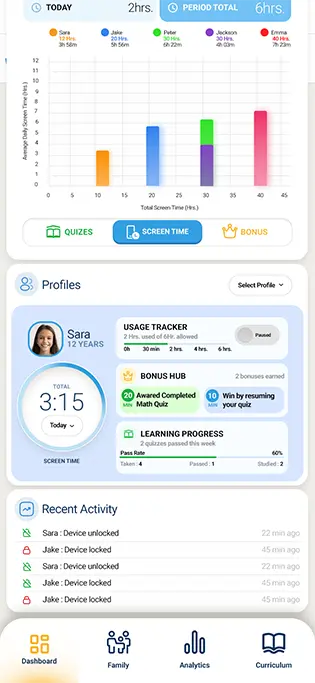
Lock your child's device instantly with a single tap from your parent dashboard when they need a break.
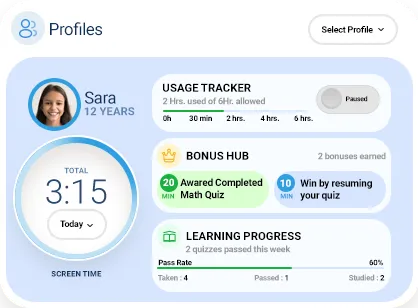
Gain deep insights into their screen time activity, search queries, and learning progress trends.
Manage multiple children separately, each with their own age-appropriate rules, schedules, and learning goals.

LEARNING BUILT INTO SCREEN TIME
Quizzes That Grow With Your Child
AcadiLock automatically prepares quizzes according to the learning preferences configured by the parent.


AI-Generated Quiz
Parents don't have to spend their evenings writing questions. AcadiLock keeps appropriate quizzes readily available based on the child's configured learning profile.
As the child progresses, parents can update the grade, subjects and difficulty level.
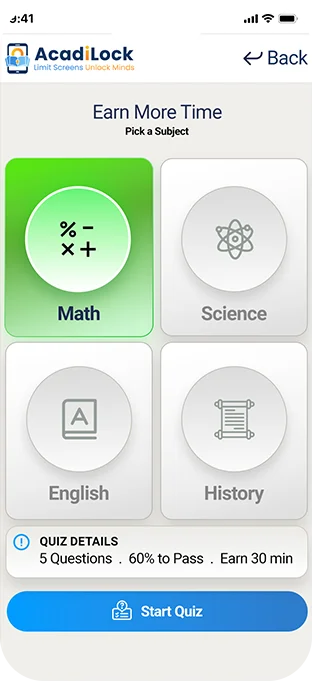
Understand how much screen time is available.
Earn screen time by completing quiz questions.
Know exactly how many questions to solve.
Get bonus screen time instantly upon quiz completion.
Clear rules reduce arguments and build trust.
NOT JUST ANOTHER LOCK SCREENBoundaries They Can Understand.
Boundaries They Can Understand.
Rewards They Can Earn.
ACADILOCK VS TRADITIONAL PARENTAL CONTROL
More Than a Screen Time Blocker
 CAPABILITY
 ACADILOCK
 TRADITIONAL SCREEN CONTROL
 Daily & Weekly Screen Limits
 Usage Schedules
 App & Category Controls
 Remote Parent Controls
 Multiple Child Profiles
Varies
 Learning-Based Screen Rewards
 Automatically Generated Quizzes
 Grade-Based Learning Content
 Tailor quizzes to current lesson plans.
 Screen Time Earned Through Learning
 Quiz Performance History
 Parent Learning Preferences
 Combines Control + Education
Built for Parents.
Designed for Kids.
Stay in Control
Manage limits, apps, schedules, children, learning preferences and device activity from your phone.


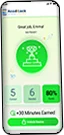


Learn. Earn. Unlock.
A simple child-friendly experience for understanding limits, completing quizzes and earning additional screen time.
See AcadiLock in Action
7:30 AM
School-day screen time rules become active.
4:00 PM
Your child uses their available screen time.
6:15 PM
Today's configured limit is reached.
6:16 PM
AcadiLock applies the appropriate restrictions.
6:20 PM
Your child completes an available Math quiz.
6:25 PM
Quiz passed — 20 minutes earned.
6:25–6:45 PM
Bonus screen time becomes available.
6:45 PM
The reward period ends and the configured controls resume.

Better Screen Habits for the Whole Family

For Parents

More Control
Manage screen time around your family's routine.

More Visibility
Understand usage, learning and reward activity.

Less Negotiation
Establish rules and rewards ahead of time.

More Flexibility
Adjust limits, schedules and learning preferences as your child grows.
For Kids

Clear Expectations
Understand when screen time is available.

A Way to Earn More
Turn learning into meaningful rewards.

Positive Motivation
Make additional screen time something that can be achieved.

Learning That Evolves
Quizzes adapt to configured grade, subject and difficulty preferences.
Every Family Is Different.
Your Controls Should Be Too.

The Weekday Family
2 Hours Daily
Monday -Friday · 4 PM–9 PM
The Weekend Family
Limited Weekdays
Extended Weekend Access
The Study-Focused Family
Restricted Entertainment
Learning Rewards Enabled
The Flexible Family
Weekly Allowance
Child Decides When to Use It
OUR PRICING
Simple, Affordable Pricing
Experience the full AcadLock platform with unlimited access to both the Parent and Child Apps. No feature restrictions during your trial. Choose the subscription plan that's right for your family.
Loading Pricing Plans...
Trial & Billing
FREQUENTLY ASKED QUESTIONS
Common Questions Asked By Parents
A BETTER APPROACH STARTS HEREDon't Just Limit Screen Time.
Don't Just Limit Screen Time.
Turn It Into Something Valuable.
Give your child clearer digital boundaries while creating opportunities to learn, earn and build better screen habits.
